PayPal card payment guide
Pay by card without a PayPal login
The website uses PayPal for payment processing. You can still pay with a debit or credit card as a guest.
Choose your pass
Open /subscription, choose the pass you want, review the amount and auto-renew setting, then continue to the secure PayPal checkout.
Choose Debit or Credit Card
On our PayPal checkout, use the black “Debit or Credit Card” button. Do not choose “Pay with PayPal” if you do not want to sign in to a PayPal account.
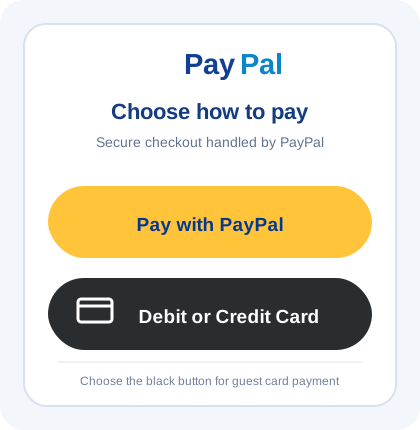
Choose the black Debit or Credit Card button for guest payment. Complete the guest card form
Enter the card and billing details directly in PayPal’s secure form. Use the billing country and postal code registered with your card. Lata Pictures does not receive or store the card number.
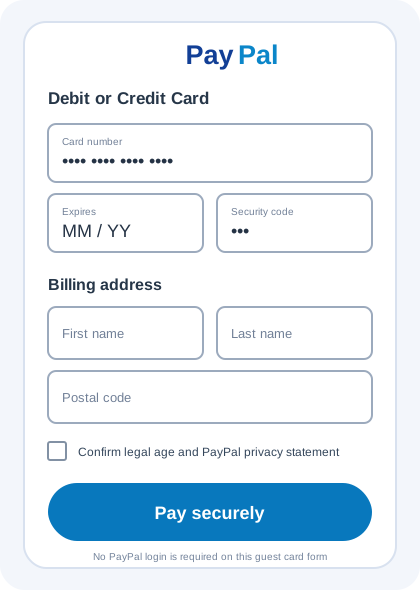
The guest card form is hosted by PayPal and does not require a PayPal login. Return after payment
After PayPal confirms the payment, wait for the website to return automatically. Do not close the page or pay again while confirmation is in progress.
Two valid choices
Use Pay with PayPal for a PayPal account, or Debit or Credit Card for guest card payment. Both are processed securely by PayPal.
Protect your payment details
Never send a full card number, security code, password, SSN or verification code in support chat. Enter card details only in the PayPal form.
Never send your SSN, identity documents, passwords or verification codes in support chat.
Already charged or payment pending?
Do not pay again. Contact support with the provider name and transaction reference so we can check the payment.